|
iQue Forecyt® Reference Guide (Version 10.0)
|
Compensation (Design Tab)

The Compensation sub-tab in Design is part of your plate design that will be used by the other Compensation—the Compensation tab—to set up Compensation controls required by Auto-Compensation after you’ve acquired data from your plate. The Compensation sub-tab in Design is used to setup compensation controls. These are necessary to use the Auto-Compensation Feature.
Here is the important thing to remember: How you set up Compensation in the Design tab will impact the Compensation aspect of your experiment and will save you time in perhaps having to perform manual Compensation later. If you have room on your plate, identify wells that correspond to the dyes and channels you will be using and also specify one well as Unstained. If you don’t have room on the plate make a separate Compensation plate.
The Compensation sub-tab displays all the colors associated with the lasers you specified in Analysis Parameters. You can add more specific labels to the name, such as the dye you’re using, by clicking on Customize. In the following screenshot, the VL1 channel was named for the dye that will be used there, Zombie Violet.
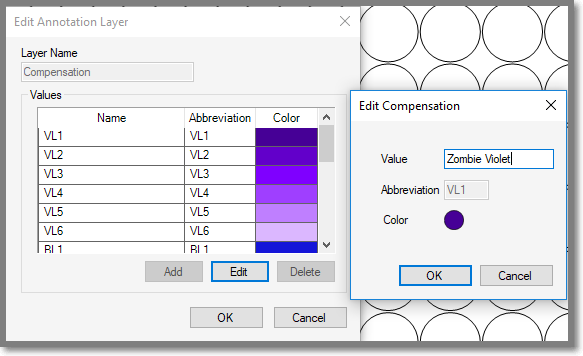
Now you can see the VL1 Channel is renamed to correspond with the dye.
